
A caller opens in English, drops half a sentence of Hindi in the middle, and finishes in English. That is one utterance, not two, and it breaks voice agents in two places. The speech model has to notice the switch inside a single breath, and the reply has to follow the caller rather than the script. On Foan that is handled underneath the prompt.
What is code switching, and why is it a phone problem?
Code switching is moving between languages inside one conversation, often inside one sentence. In India it is not an edge case, it is the default register for a huge number of phone calls. "Bhai, mera order abhi tak nahi aaya, can you check the status" is a single sentence with two grammars in it, and nobody who says it thinks of themselves as speaking two languages.
Written text hides how hard this is. On the phone there is no punctuation, no spelling and no second chance. The audio arrives once, in whatever accent the caller has, over whatever line they are on, and the agent has to act on it immediately. Two things have to go right, and they are different problems with different fixes.

Problem one: hearing the switch inside one utterance
A speech system that is told the call is in English will map Hindi words onto the nearest English sounds. You do not get an error. You get a transcript that looks plausible and means nothing, and an agent that answers confidently to something the caller never said. The same happens in reverse when a system is pinned to Hindi and the caller says a product name, a date format or an email address in English.
This is why a language setting is a weaker tool than it looks. Pinning a language is the right move when you genuinely know the call will be in one language. It is exactly the wrong move when your callers mix. Real Indian phone traffic mixes.
The other half of the problem is vocabulary that belongs to no language. Brand names, dish names, drug names, building names and street names do not obey the grammar around them. A model that has correctly identified the sentence as Hindi still has to render an English proper noun inside it, and vice versa.
Problem two: replying in the language the caller actually used
Recognising the switch is only half the job. The reply has to follow. An agent that hears Hinglish perfectly and answers in formal English has still failed the call, because the caller now has to change register to keep talking to it.
This is where the obvious fix does not work. The instinct is to write a line into the prompt along the lines of "always reply in the language the caller used". On the speech to speech path, where one model takes audio in and produces audio out, that instruction is unreliable. The model begins forming its reply almost as soon as the caller's audio stops, and it does not consistently apply a language rule in time for that reply to be shaped by it. You end up with an instruction that reads correctly, tests fine in a text environment, and gets ignored on live calls.
Foan therefore does not ask you to write that rule. Language following is handled below the prompt, in the layer that sits between the telephony leg and the model, and it has been running in production since 15 September 2026. The practical consequence for you is short: you do not write a language rule, and the agent follows the caller into Hindi or Hinglish anyway.
That also protects something scarce. Your instruction fields share one budget, capped at 4,000 characters across all of them with a warning at 3,000. Every line spent restating a behaviour the platform already handles is a line you cannot spend on what your business actually does.
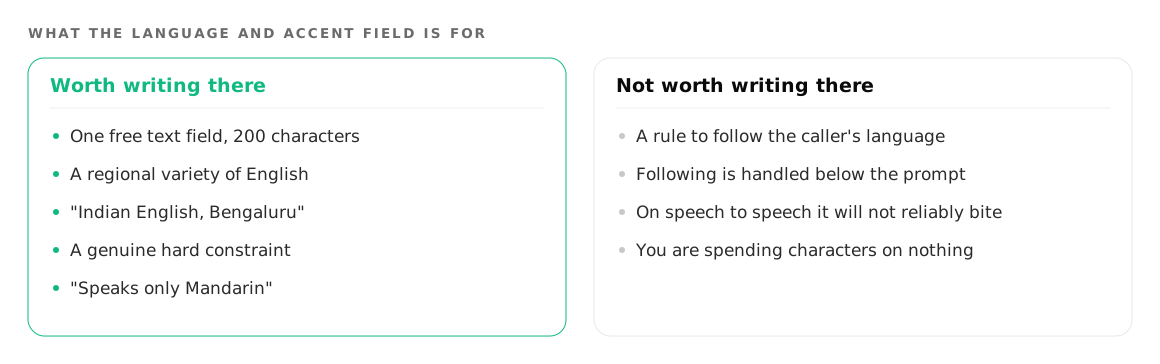
What the "Language and accent" field is for
A Foan voice agent has one free text field labelled Language and accent, capped at 200 characters. It is not a dropdown, and there is no list to pick from. The placeholder in the product is "e.g. Singaporean English, or speaks only Mandarin", which tells you what it is really for.
Two things are worth writing there:
- A regional variety of English. "Indian English, Bengaluru", "Singaporean English", "British English" and similar descriptions do useful work, because they shape delivery rather than fight the caller.
- A genuine hard constraint. "Speaks only Mandarin" is a real instruction for an agent whose callers are known to be monolingual, and it means something different from a preference.
What is not worth writing there is a rule about following the caller's language. You are spending characters on behaviour that is already handled, and on the speech to speech path you are spending them on an instruction that will not reliably bite.
How do you fix a word the agent keeps mangling?
Use the separate Pronunciation field on the voice agent. It takes the same free text shape, and the product's own example is "Foan as Phone, Foan AI as Phone A-I". You write the word and the sound you want out of it.
This is the right home for the small set of words a code switching agent will otherwise get wrong: your brand, your two or three hardest menu items, an area name, a product SKU that reads like an acronym. Keep it short. A pronunciation list that turns into a glossary eats the same instruction budget as everything else, and most words do not need the help.
A restaurant agent is the clearest case of this, because the menu is exactly the vocabulary that sits inside a Hinglish sentence. That workflow is covered in more detail in AI voice agents for restaurants.
Where explicit single language selection does exist
Not every call runs on a single speech to speech model. On the path where transcription is a separate step from generation, Foan does support explicit single language selection, and the choice routes the audio to whichever provider handles that language best:
| Group | What it covers | How it is routed |
|---|---|---|
| English | English only | One provider specialised for it |
| Indian | 22 Indian languages, including Hindi, Bengali, Kannada, Malayalam, Marathi, Tamil, Telugu, Gujarati, Punjabi, Odia, Assamese and Urdu | A second provider tuned for Indian speech |
| Global | English plus a set of widely used international languages | A third provider with broad international coverage |
Beyond those groups there are dozens of further international languages available on that path, from Arabic and Japanese to Portuguese, Turkish and Vietnamese.
Pick an explicit language when you know the call is monolingual and you want the best possible transcription of that one language. Do not pick one when your callers mix, because you will have optimised for the case you do not have.
Why Foan will not tell you how many languages it supports
Because the honest answer is that the product contains two language lists and they do not agree with each other. One is an older set of locale codes exposed by an API endpoint. The other is the routing registry that decides which provider handles which language. Publishing a single headline count would mean picking whichever number flatters us and hoping nobody checks.
The claim that survives scrutiny is the one above: English, 22 Indian languages, and dozens more international languages on the path that supports explicit selection. If a specific language matters to your deployment, ask about that language rather than trusting a total.
You cannot judge this from a written answer, so create a free account, build one agent and call it yourself in the way your callers actually speak. Phone agents covers the voice path, and the web chat widget shares the same knowledge if you want a typed fallback for callers the line keeps mishearing.
How to test code switching on your own agent
Do this before you put an agent in front of customers, not after.
- Call it and switch mid sentence. Not between sentences, mid sentence. Start a question in English and finish it in Hindi.
- Say your brand name inside a Hindi sentence. This is the single most common failure and the easiest to fix, in the Pronunciation field.
- Read a number, a date and an email aloud in the other language. Strings are where code switching quietly falls apart.
- Switch back. An agent that follows you into Hindi and then cannot come back to English is only half working.
- Read the transcript afterwards. A wrong transcript with a confident reply on top of it is the failure mode you are hunting for, and you will not hear it during the call.
Do all of this from a mobile on a normal network, not from a quiet room on a headset. Your callers will not be in a quiet room. How the agent handles interruptions and pauses on that same noisy line is a separate problem, covered in turn taking.
Where to go next
If you are setting an agent up from scratch, start with how to build an AI phone agent and come back to the language fields once the agent is answering. If you want to hear code switching handled on a live call before you build anything, the voice product page is the place to start.
Try it on your own number
Build an agent, point a number at it and listen to the first call.