
A voice agent hallucinates when it is asked something its sources do not answer and nothing tells it what to do about that. The fix is structural: split your material into one source per topic, write each answer short and self-contained, keep anything volatile out of a file you cannot edit, and state in the agent's instructions exactly what it should say when it does not know.
The mechanics below take about twenty minutes. The writing is what decides whether it works.
Why does an agent invent answers in the first place?
Two reasons, and neither is fixed by uploading more material.
The first is a gap with no fallback. A caller asks whether you validate parking. Nothing in your sources mentions parking. The model is holding a conversation, the caller is waiting, and the most conversationally plausible next sentence is a confident yes. Unless you have written down what to say instead, it will produce something.
The second is ambiguity. Your sources say two different things, or one thing in a way that reads two ways, and the model picks. A cancellation window written as "24 hours" in one document and "one day before" in another will be resolved by a guess about which applies to the caller in front of it.
Both are content problems. A retrieval system can only return what you gave it.
Knowledge or Catalogue: which one do you need?
Foan has two separate features here, and putting material in the wrong one is a common false start.
Knowledge is for prose. Policies, opening hours, procedures, eligibility rules, FAQs, anything you would answer in a sentence or two.
Catalogue powers Product Search, and it is for a structured list of items with attributes that a caller searches through: products, dishes, SKUs, plans. It is attached in its own Product Search accordion on the agent.
A restaurant keeps its table policy, timings and cancellation rules in Knowledge, and its dish list in a Catalogue. Load a 400-item menu into Knowledge as a PDF and the agent will struggle to answer a question about one dish, because prose retrieval is the wrong shape for that job.
Step 1: Split your material into one source per topic
Before touching the dashboard, decide your sources. A source is a unit of maintenance, not a unit of storage, and the right count is usually between three and eight.
Good splits look like this:
| Source | Covers |
|---|---|
| Hours and location | Opening times, holidays, address, parking, access |
| Booking and cancellation | How to book, deposits, changes, no-show policy |
| Returns and refunds | Windows, conditions, how a refund is issued |
| Service scope | What you do, what you explicitly do not do |
| Escalation rules | What goes to a human, and when |
The reason to split by topic is not retrieval quality. It is that a knowledge source cannot be edited after upload. When your cancellation policy changes, you want to delete and re-add one small source, not rebuild a single monolithic company handbook. Design each source so that any realistic change touches exactly one of them.
Step 2: Write answers that stand on their own
Every chunk of text your agent retrieves may be read in isolation, without the heading above it or the paragraph before it. Write accordingly.
Weak, because it depends on context that may not travel with it:
Cancellations
As noted above, the standard window applies. Exceptions are handled
per the policy in Appendix B.
Strong, because it answers the question by itself:
Q: Can I cancel a booking and get a refund?
A: Yes, if you cancel at least 24 hours before the booking time.
Cancel by calling the restaurant or replying to the confirmation
message. Inside 24 hours the deposit is not refunded.
Four rules produce text like the second one.
Lead with the answer. The first sentence should resolve the question. Reasoning, if any, comes after.
Repeat the noun. Write "the deposit is not refunded", not "it is not refunded". Pronouns lose their referent the moment a passage is retrieved on its own.
Keep each answer to a few sentences. Long passages get trimmed. Foan cuts retrieved results at a sentence boundary, so a long answer may arrive with its later qualifications missing. If a qualification matters, put it in the same sentence as the claim, not three sentences down.
Write out the negatives. "We do not take group bookings over twelve" is a fact worth storing. Unstated exclusions are exactly where invented answers appear, because nothing contradicts the guess.
The next three steps are dashboard work, so create a free account and build the source as you read. The same knowledge base feeds a phone agent and a web chat widget, so it is worth getting the structure right once.
Step 3: Create the knowledge base
In the dashboard, go to Knowledge, then Add Knowledge Base.
Fill in the name, which the placeholder suggests as something like Opening hours & reservations, and the description, prompted with What this source covers, e.g. timings, table policy, cancellations. Write the description properly. It is how you and anyone else on your team will recognise this source later, when there are eight of them and one needs deleting.
Then give it content, one of two ways:
- Upload files. Up to 5 files per source, each up to 4 MB, in
.pdf,.docx,.txtor.md. - Paste text into the box labelled
Paste FAQs, policies, or any details your agent should know.
If you skip both, the form tells you to upload at least one file or paste some text.
Prefer pasting for anything short. A pasted block is text you wrote for the agent. A PDF is usually a document written for a human, carrying headers, footers, page numbers, a logo and a table of contents, all of which become noise. If your policy fits in a text box, paste it.
Ingestion is asynchronous. The source is processed after you save, and it is not usable until its status reaches ready. If you are creating sources through the API, poll for that status rather than assuming the agent can answer the moment the request returns.
Step 4: Attach the source to your agent
Open the agent, expand the Knowledge Bases accordion, and attach the sources it should use. Sources live at organisation level, so one well-written returns policy can serve a phone agent and a web chat agent at once. Sharing one source across both channels is the main reason to write it carefully, and it is covered in one knowledge base, two channels.
Attach only what the agent needs. An agent handling delivery queries does not need your careers FAQ, and every irrelevant source is another chance for a near-miss retrieval.
Step 5: Write what the agent says when it does not know
This is the step that actually prevents hallucination, and it goes in the agent's instructions, not in the knowledge base.
Something like:
Answer only from the knowledge provided. If the knowledge does not
cover the caller's question, say: I do not have that detail here,
but I can have someone from the team confirm it for you. Never
guess at prices, timings or policy.
Three things make that work. It names the boundary, it supplies the exact sentence to say instead of leaving the model to improvise one, and it offers the caller a next step so the refusal does not end the conversation badly.
Keep it compact, because instruction space is finite. All customer-authored instruction fields on an agent share a 4,000 character ceiling, with a warning at 3,000, and that budget covers identity, personality, task, tool instructions and this rule together. This is the strongest practical argument for moving facts out of the prompt and into knowledge sources: the prompt should hold behaviour, and the knowledge base should hold the facts.

How does retrieval actually work?
Worth knowing, because it changes how you write.
A small knowledge base is placed directly into the agent's prompt. There is no search step and no tool call. The facts are simply present for the whole conversation, which is the most reliable arrangement available and the reason a compact, well-edited knowledge base outperforms a large sprawling one. The default cutoff is on the order of 32,000 characters of content.
Above that, the knowledge base becomes a search the agent runs during the conversation, when it decides it needs something. The match is semantic rather than keyword based, so a caller asking "can I get my money back" will reach a passage headed "refunds" without using the word. Results are trimmed at a sentence boundary before the model sees them.
Two consequences follow. Prune before you add, because staying under the inline threshold removes an entire failure mode. And phrase headings the way callers speak, since a heading reading "Post-purchase remediation" is semantically further from a caller's actual words than "Refunds and returns".
What should never go in a knowledge base?
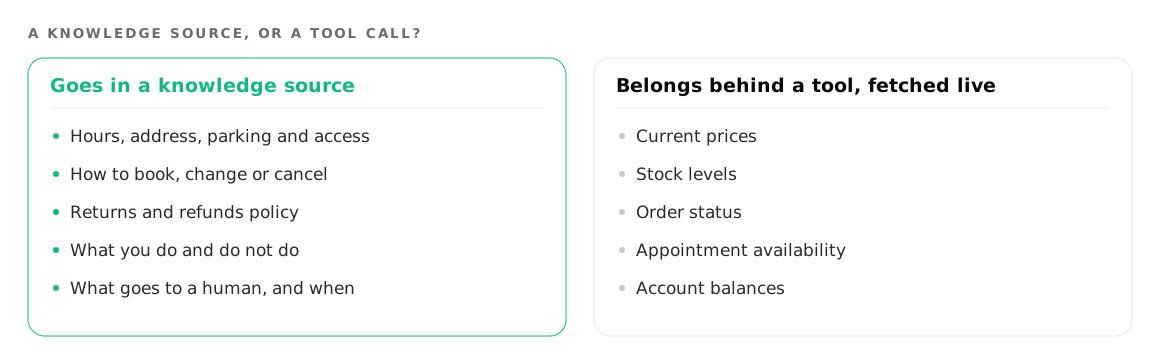
Anything that changes faster than you are willing to rebuild a source, because you cannot edit one after upload.
Current prices, stock levels, order status, appointment availability and account balances all belong behind a tool that queries your live system during the call. The knowledge base can hold the structure around them, such as how pricing is composed or what the delivery windows are, while the number itself is fetched at the moment it is needed. Connecting an agent to your own systems covers how that call is wired.
Also leave out internal notes, staff instructions and anything you would not want read aloud. A knowledge source exists to be spoken to a caller, and eventually some of it will be.
Where to go next
If you have not built the agent yet, start with how to build an AI phone agent and add knowledge once it holds a conversation. To put the same sources behind a chat widget on your site, see web agents.
Try it on your own number
Build an agent, point a number at it and listen to the first call.