
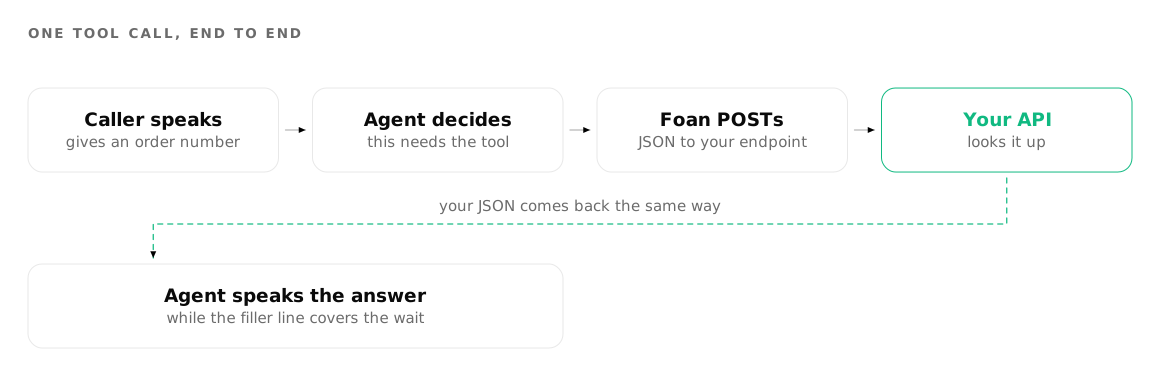
A voice agent is only as useful as the systems it can reach. In Foan you connect it with tools: named actions you define on the agent, each pointed at one HTTPS endpoint you own. The agent decides when an action is needed, collects the facts it requires, POSTs them to your URL, and reads your reply back to the caller.
This guide covers every field in the tool editor, the exact payload your endpoint will receive, the response contract, and the wider API surface around it.
What is a tool, in one sentence?
A tool is a promise to the model: when the conversation reaches this situation, gather these specific facts and send them to this URL. Everything else follows from that. The name and instructions decide when the tool fires. The questions decide what arrives. The webhook decides where. The behaviour settings decide what the caller hears while it happens.
Open the agent, expand the Integrations accordion, and add a tool. The editor has four sections: Basics, Questions, Webhook and Behavior. Work through them in order.
Step 1: Name the action and say when to use it
Action name is what a human reads. The placeholder is Book Event. From it, Foan generates the snake_case tool name the model actually sees, matching ^[a-zA-Z][a-zA-Z0-9_]{0,63}$, so Book Event becomes book_event.
Instructions is the trigger condition, and it is the field people underwrite. It is not a description of your API. It is guidance to the model about the moment this tool belongs in. The placeholder shows the right shape:
Use this tool when the user wants to book an event.
Collect the event name, date, and time before calling.
Two rules make this work. Name the trigger, not the mechanism: write "when the caller asks where their order is", not "queries the orders service". And name the preconditions, so the model gathers what it needs before firing rather than calling with blanks and asking follow-up questions afterwards.
Remember that this text competes for the same budget as the rest of the agent's prompt. All customer-authored instruction fields on an agent share a 4,000 character ceiling, with a warning at 3,000. Tool instructions are part of that total, which is another reason to keep each one to two or three lines.
Step 2: Decide what the agent must collect
Each Question in the tool becomes one field in the payload. A question has a prompt the agent may ask, an Answer key that names the field, and a Type.
| Type | Stored as | Use it for |
|---|---|---|
| Text | text | Names, order references, free description |
| Date & time | datetime | Appointments and slots, with a Default timezone |
| Yes / No | yesno | Confirmations and consent |
| Choice | choice | A fixed set, listed in Options (comma-separated) |
| Phone number | phone | A number that is not the caller's own |
| List of text | list_text | Several items, such as a multi-item order |
Two fields matter more than the rest.
Mapped value supplies a value instead of asking for it. The hint reads "Use a specific value instead of asking the user", and the placeholder is e.g., {{participantName}} or a fixed value. Anything you can fill from a custom variable or a constant should go here. Every question you map is one question the caller never has to answer.
Required decides whether the model will chase a missing answer before it calls. Mark only what your endpoint genuinely cannot work without. A required field the caller cannot easily supply turns a thirty second call into a two minute interrogation.
You will want a live agent to point at while you read this, so create a free account and build the tool as you go. Phone agents covers the call mechanics around the tool, and the developer reference has the payload in full. A tool that takes two seconds to answer also changes what the call costs, which pricing explains.
Step 3: Point the tool at your endpoint
The Webhook section is short, and its limits are worth knowing before you design the endpoint.
- Webhook URL, which must start with
httporhttps. - Bearer token, optional. When set, it is sent as an
Authorization: Bearerheader. - Timeout (ms), default
10000. - Retries, default
0.
The method is fixed to POST. There is no method picker and there is no custom headers field, so a bearer token is the only credential a tool can carry. If your API expects a key in a custom header or a query string, put a small adapter in front of it that accepts the bearer token and rewrites the request. Do not weaken your API to fit.
Design to those defaults rather than around them. Ten seconds is a long time on a live call and a short time for a cold database query. If a lookup can take longer, return a fast acknowledgement and do the slow part asynchronously.
Step 4: Set what the caller hears while it runs
The Behavior section is the difference between a tool that feels deliberate and one that feels like dead air.
Confirm before running is on by default, with a confirmation question that reads "Just to confirm, should I do this now?". Keep it on for anything that writes, charges or cancels. Turn it off for a read-only lookup, where a confirmation step just adds a turn.
Prevent duplicates is on by default. Foan sends an Idempotency-Key header derived from the call id, the tool name and a hash of the answers, so a repeated call with identical answers can be recognised on your side. Store that key and return the original result when you see it again. This is the cheapest protection you will get against a double booking.
Then three lines of speech, with these defaults:
- Say while running: "Please wait while I process your request..."
- Say on success: "Done! Your request has been processed."
- Say on failure: "Sorry, something went wrong. Please try again."
Rewrite all three in your own voice. The failure line in particular should tell the caller what happens next, because it is what they hear when your endpoint times out.
One hard limit to plan around: an agent can hold a maximum of five function tools. Five well-scoped actions beat eight overlapping ones anyway, but if you are pushing the cap, collapse related actions into a single endpoint that branches on a choice answer.
What does Foan actually POST?
This is the body your endpoint receives:
{
  "tool_name": "book_event",
  "args":    { "event_name": "Diwali dinner", "guests": "6" },
  "answers": { "event_name": "Diwali dinner", "guests": "6" },
  "call_context": {
    "call_id": "<room name>",
    "room_name": "<room name>",
    "org_id": "...",
    "agent_id": "...",
    "participant_number": "+919740891516",
    "participant_name": "...",
    "plivo_call_uuid": "..."
  }
}
args and answers carry the same object. Mapped values are merged in and override anything the model produced, so a mapped field is authoritative. Read whichever you prefer.
The headers that come with it:
Content-Type: application/json
User-Agent: foan-bridge/1.0
Authorization: Bearer <token>      only when a bearer token is set
Idempotency-Key: <sha256>          only when Prevent duplicates is on
What should your endpoint return?
Reply with JSON containing a result string. That string is what the model receives, and it is the basis of what the caller hears:
{ "result": "Booked for 7:30pm on 8 November. Reference RG-1234." }If the body has no result key, the whole JSON body is handed to the model as a string, which usually means the agent reads out something shaped like a database row. Always send result, and write it as a sentence rather than a record.
A minimal handler:
app.post("/foan/book-event", async (req, res) => {
  const { answers, call_context } = req.body;

  const booking = await createBooking({
    title: answers.event_name,
    guests: Number(answers.guests),
    phone: call_context.participant_number,
    idempotencyKey: req.get("Idempotency-Key")
  });

  res.json({ result: `Booked for ${booking.time}. Reference ${booking.ref}.` });
});
On an HTTP error or a timeout, the agent speaks the Say on failure text and the conversation continues. It does not stall and it does not hang up. That is forgiving behaviour, and it is also why a silent 500 can go unnoticed for days: log your own failures, because the call will not surface them for you.
What does the agent already know without asking?
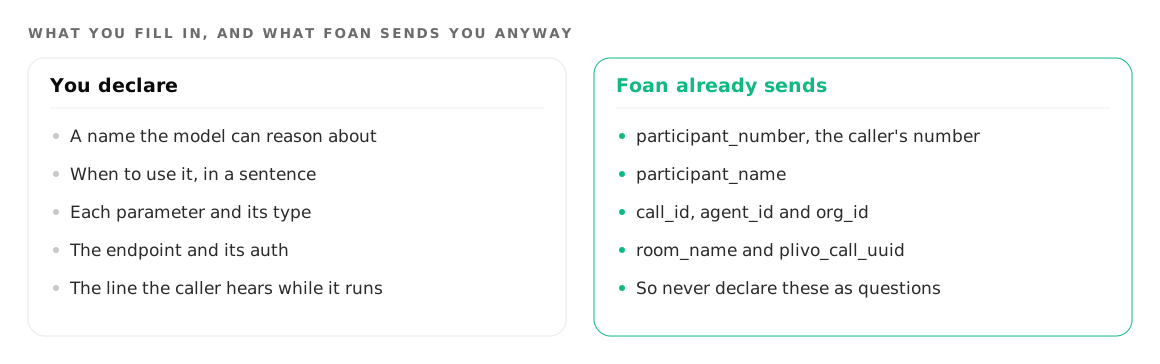
The caller's number. It is built once per call and sent on every tool webhook as call_context.participant_number.
This matters because the most common tool design mistake is declaring a required phone question. The agent then dutifully asks a caller to read out the number they are calling from, mis-hears a digit, and the lookup fails. Never declare a required phone question on a tool that runs during a call. Use call_context.participant_number and reserve the phone type for a different number, such as an alternate contact for a delivery.
The same principle applies to participant_name and any custom variables you have set on the agent. Anything already in context should be mapped, not asked. For an order status agent, that single change is often the whole difference between a workable call and an annoying one, as D2C order support on the phone goes into.
What should never go in a tool?
Two things.
Do not put a secret in a place a tool can expose. The bearer token is stored with the tool configuration, and on a chat agent the widget token is public by design, which means the setup of every tool the agent calls is readable by anyone viewing the page source. Give tools a scoped credential that can do exactly one thing, and nothing else.
Do not use a tool as a substitute for knowledge. Static facts such as opening hours, policies and menus belong in a knowledge base, where the agent reads them without a network round trip. Tools are for the things that change per caller: an order, a slot, a balance, a booking.
If you would rather see a finished example than a spec, wiring a where-is-my-order agent to a real order API walks through the same machinery end to end, and turn taking explains why the filler line matters so much while your endpoint is thinking.
Beyond tools: the REST API, the CLI and MCP
Tools are the agent reaching out. The rest of the platform is you reaching in.
The public API lives at https://api.foan.ai/api/v1, authenticated with an API key as a bearer token. Every response uses the same envelope:
curl https://api.foan.ai/api/v1/voice/agents \
  -H "Authorization: Bearer $FOAN_API_KEY"
{ "success": true, "data": {}, "message": "..." }Create keys under Developers, then API Keys, and pick scopes deliberately. Scopes are granular, covering reads and writes separately across calls, recordings, agents, campaigns, numbers, knowledge, billing and the wallet. A key that only needs to place a call should hold calls:create, not agents:write.
For scripting there is the foan-ai npm package, which installs a foan binary and supports both OAuth login and API-key auth:
npm install -g foan-ai
foan login
foan agents list
foan calls list
And for driving Foan from an AI coding tool, there is a hosted MCP server at https://api.foan.ai/mcp, over Streamable HTTP, authenticated with the same API key as a bearer token or with OAuth 2.1. It exposes agents, campaigns, calls, knowledge bases, numbers and account operations as tools. Destructive operations return a dry-run preview first and only act when you confirm.
One honest limitation: there is no customer subscribable call completed webhook today. To get transcripts, outcomes and recordings into your CRM or warehouse, pull them from the call history endpoints on a schedule, using the API, the CLI, or the MCP server. Plan for a pull, not a push. The full endpoint reference is on the developers page.
Where to go next
Build the agent first and add tools once it holds a decent conversation without them, then give it the static facts it needs in a knowledge base it will not hallucinate from. For what a tool-equipped agent can do on a live line, see phone agents.
Try it on your own number
Build an agent, point a number at it and listen to the first call.