
The most common support call a D2C brand gets is a question your API can already answer: where is my order. A voice agent handles it end to end by calling a tool on your own endpoint, reading back the status in one sentence, and ending the call. This post shows the whole path, from the tool definition to the JSON your server receives and what it must send back.
Order status is the right first thing to automate because it needs no judgement. There is a record, it has a state, and the caller wants the state. Everything harder than that belongs in the second half of this post.
What does the lookup tool need?
A tool in Foan is defined on the agent, in the Integrations section, and it has four parts: basics, questions, webhook and behaviour.
Basics is the action name and the instructions. The action name is what you would call the thing in plain words, for example Check Order Status, and it generates the snake case tool name the model sees. The instructions tell the model when to reach for it. Write them as a trigger plus a precondition: use this tool when the caller asks about an order, after you have the order number.
Questions are the pieces of information the tool needs before it runs. Each question has the text the agent asks, an answer key your endpoint receives, and a type. For order lookup, one question is usually enough.
| Question | Answer key | Type | Required |
|---|---|---|---|
| What is your order number? | order_number | Text | Yes |
What should not be in that table matters more than what is. Do not ask for the phone number. The caller's number is already sent to your endpoint on every tool call as call_context.participant_number. An agent that asks a customer to recite the number they are calling from sounds like a badly built IVR, and the only reason it happens is that someone declared a required phone question on the tool. Leave it out.
Two other things you do not need to ask for. Anything you can set as a mapped value on the question, such as a custom variable already on the call, is filled in without the agent speaking. And anything your endpoint can derive from the caller's number, such as the most recent order, is better derived than requested.
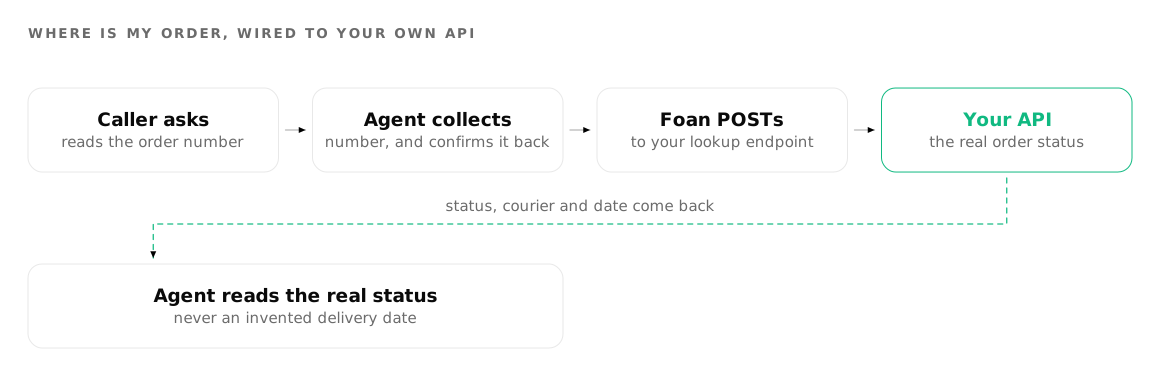
What the bridge POSTs to your endpoint
When the model calls the tool, Foan sends a POST to the webhook URL you configured. The method is fixed to POST. You can set a bearer token, and there is no custom headers field, so design your endpoint around bearer auth.
{
  "tool_name": "check_order_status",
  "args":    { "order_number": "AB-10482" },
  "answers": { "order_number": "AB-10482" },
  "call_context": {
    "call_id": "<room name>",
    "room_name": "<room name>",
    "org_id": "...",
    "agent_id": "...",
    "participant_number": "+919740891516",
    "participant_name": "...",
    "plivo_call_uuid": "..."
  }
}
args and answers carry the same object, with any mapped values merged in and overriding whatever the model produced. Alongside the JSON you get Content-Type: application/json, a User-Agent of foan-bridge/1.0, an Authorization: Bearer header when you set a token, and an Idempotency-Key header when duplicate prevention is on.
So a minimal order status handler reads answers.order_number, falls back to call_context.participant_number when the caller cannot find their order number, and looks the record up.
The fastest way to see the payload is to receive one, so create a free account, point a tool at a test endpoint and place one call. Ecommerce covers the wider support picture, phone agents covers the call path, and pricing explains why a slow endpoint shows up on your bill.
What should your endpoint send back?
Reply with JSON containing a result field.
{ "result": "Order AB-10482 shipped on Tuesday and is out for delivery today." }The bridge reads your JSON and hands the model the value of result if it is there, and otherwise stringifies the whole body. Both work, but the first gives you control of what the caller hears. Write result as one or two spoken sentences, not as a data structure. The model will read around a JSON blob, and it will read it badly.
Three practical rules for that string:
- Speak dates, do not print them. Tuesday, or the fourteenth of October. Not an ISO timestamp.
- Give one next action. Out for delivery today. Held at the hub, expected tomorrow. Returned to origin, we can reship.
- Do not include anything you would not read to a stranger who dialled that number. The caller is identified by the line they are calling from, which is a weak identifier.
When your API is slow or broken
Two fields in the webhook section govern this. Timeout (ms) defaults to 10000, and Retries defaults to 0. Ten seconds is a long silence on a phone call, so if your lookup is usually fast, lower it. If it is genuinely slow, use the Say while running line so the caller hears something rather than dead air.
When the call fails or times out, the agent speaks the tool's Say on failure text. The default is a generic apology, and you should replace it. A good failure line for order status offers a fallback rather than a shrug, for example an offer to text or email the update, or to put the caller through to the team. That single line is the difference between a failed lookup and a failed call.
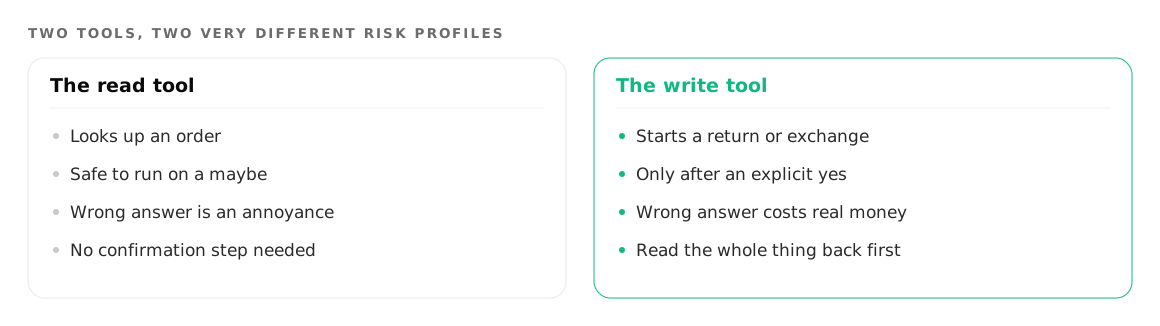
Returns and exchanges: the tool that writes
The second tool most D2C brands want is a return or exchange request. This one is different in kind, because it changes state in your systems.
Its questions are longer: the order number, which item, and a reason. Use a Choice type for the reason with your actual return reasons as options, rather than a free text field, so your endpoint receives a value it can act on instead of a sentence it has to parse.
Two behaviour settings carry the weight here.
Confirm before running is on by default. Leave it on. The agent reads back a confirmation question before the tool fires, so the caller hears what is about to happen and can stop it. For a return that means the customer confirms the item and the reason before anything is created. Write your own confirmation question rather than keeping the default, and make it specific to the action.
Prevent duplicates is also on by default, and it is what stops one hesitant customer producing three return requests. The bridge sends an Idempotency-Key header derived from the call, the tool name and a hash of the answers, so a retried call with the same answers arrives with the same key. Your endpoint should treat a repeated key as the same request and return the same result. This only works if you implement the server side of it, so build that before you turn the tool loose.
The two together give you the pattern for any writing tool on a phone call: confirm in the conversation, deduplicate at the transport layer.
Where the limits are
Be honest with yourself about what belongs on the phone.
Five function tools per agent. That is a hard cap, not a soft one. For D2C support the five that usually earn their place are order status, a return or exchange request, an address or delivery slot change, cancelling an unshipped order, and a lookup of your own stock or fulfilment state. Anything else goes to your website, your email queue, or a person.
A refund decision should stay with a person. A return request is a record. A refund is money and a judgement about goodwill, condition and policy. Let the agent capture the request and transfer anything that needs a decision. On a transfer, the agent says a short connecting line, the caller waits in a conference while your team is dialled, and whoever picks up hears a brief summary of the call before joining. The agent leaves at that point. Handover is configured over the API rather than a dashboard screen, so plan for it when you build the agent. More on the behaviour in transferring a call from AI to a human.
Product search is not your knowledge base. If you want the agent to answer questions about products themselves, sizes, materials, what is in the box, that is the catalogue feature, which is separate from knowledge bases and attached to the agent in its own section. A knowledge base holds your policies and FAQs. A catalogue holds your products. Loading a product list into a knowledge base is the most common way this use case goes wrong.
One more scoping decision. Not every order question should be a call at all. Status and tracking work well on chat, where the customer can read a tracking link instead of memorising one. The channel trade-offs are in voice agent or web chat.
Where to go next
The full mechanics of tools, payloads and authentication are in connect your AI agent to your own APIs. For the wider set of calls a D2C operation gets, see ecommerce use cases, and for how the phone side works, Foan for phone.
Try it on your own number
Build an agent, point a number at it and listen to the first call.