
An outbound campaign is a contact list, an agent, a number to dial from, and a set of rules about when and how often to try. Setting one up in Foan takes four tabs. Keeping it alive takes something else: honest consent, a real opt-out, calling hours the recipient would consider reasonable, and the discipline to stop dialling people who said no.
Both halves are covered here. Skip the second half and the first one stops working within a week, because carriers and handsets stop delivering the calls.

Step 1: Prepare the list before you open the dashboard
Most campaign problems are list problems, and no dialler setting fixes them.
Know why each number is on the list. A customer who bought from you last month, a lead who filled in your form, a patient who asked for a reminder: each of those is a relationship with a reason to call. A purchased list is not. Beyond the legal exposure, which varies by country and is worth checking for every country you dial into, cold lists generate the complaint and rejection rate that gets a number flagged.
Deduplicate, hard. The same person on a list twice means the same person called twice in one round, and that is the fastest route to a complaint. Deduplicate on the number, not on the name.
Carry your own suppression list. Anyone who has previously asked not to be called must be removed before upload. Foan permanently excludes people who say no during a Foan call, but it cannot know about the person who told your sales team to stop calling last March. That list is yours to maintain.
Fix the formatting. Full international format, country code included. Numbers are validated in the browser before upload, so a badly formatted file is caught rather than half dialled, but fixing it in your spreadsheet is faster than fixing it in an error message.
The rest of this is screen by screen, so create a free account and open a draft campaign alongside. Start with ten rows rather than ten thousand. Phone agents covers the agent that will make the calls, and pricing is worth checking before you size the list, because outbound spend is the easiest kind to misjudge.
Step 2: Fill in the Campaign Details tab
Go to Campaigns, then New Campaign. The wizard has four tabs: Campaign Details, Call Settings, Data Extraction and Follow-ups.
The first tab asks for:
- Campaign Name and Campaign Description, both internal.
- Dialing Number, the number the calls go out from.
- Target Country, described on screen as the country code to dial into.
- Campaign Duration, a start and end date.
- Timezone.
- A calling window, From and To, set as an hour with AM or PM.
The timezone and the calling window are the two fields people set carelessly and regret. The window is enforced in the timezone you choose, so the honest question is not what hours suit your team but what hours suit the person receiving the call. Business hours where they are. Not 8am, not 9pm, and not during a local public holiday that your calendar does not show.
If your list spans several timezones, split it into one campaign per timezone. It is more setup and it is the difference between a call that feels routine and a call that wakes someone up.
Step 3: Set retries and limits on the Call Settings tab
Four controls sit here, and each one is a lever on how aggressive the campaign feels from the other end.
Retry is how many times an unanswered number is tried again. Keep it low. Three attempts across a campaign reads as persistence; eight reads as harassment, and the person who blocks you after the eighth was never going to buy.
Cool Down is the wait between attempts on the same number. Long enough that the second call lands in a different part of someone's day. A cool down measured in minutes turns a campaign into a nuisance.
Max Call Duration caps a single call. This is a cost control and a safety net: it ends the conversation that has stopped going anywhere, and it stops a call that connects to a machine from running indefinitely.
Inactive Duration ends a call that has gone quiet. Silence on a line is usually a caller who has put the phone down without hanging up, and there is no reason to pay for it.
Step 4: Upload the contact list
The contact upload is on the same tab. It accepts .csv and .xlsx.
Download the template rather than building the file yourself. It arrives as campaign_contacts_template.csv with exactly the columns the campaign expects:
phoneNumber,participantName,<your custom variable names>
+1234567890,sample_name,...
phoneNumber and participantName are fixed. Every column after them corresponds to a custom variable defined on the agent, which is how a single campaign says something different to each person: an order number, an invoice amount, an appointment time. Whatever your agent's script refers to by variable, put it in its own column.
Phone numbers are checked in the browser before the file goes anywhere. When they all pass, the upload runs and confirms that every number was valid.
Step 5: Decide what to extract from each call
The Data Extraction tab defines the structured fields you want pulled out of each conversation, so a completed campaign gives you a table rather than a pile of transcripts.
Be specific and be sparing. Extracting "customer sentiment" gives you a column nobody acts on. Extracting the date a caller proposed for a site visit, or the reason they gave for not paying yet, gives you a next action. Ask for what you would otherwise pay a person to read the transcripts to find.
Step 6: Set the follow-up rules
The Follow-ups tab is where a campaign either respects people or grinds them down.
The toggle reads "Call people again after this campaign". Switch it on and when the campaign finishes, Foan creates the next round on its own, with the same agent, the same number and the same calling hours. Each round is created as its own campaign, linked to the parent, so you can see exactly what happened in round two without it being mixed into round one.
Under it is a list of who gets called again:
| Outcome | What it means | On by default |
|---|---|---|
| Did not answer | The phone rang and nobody picked up | Yes |
| Never reached | We never got to call them | Yes |
| Went to voicemail | The call reached an answering machine | Yes |
| Hung up | They picked up and ended the call straight away | No |
| Asked us to call back | They asked for another time | No |
| Unclear | They spoke, but did not say yes or no | No |
| Interested | They said yes | No |
The defaults are the three that carry no signal at all: nobody picked up, nobody was reached, a machine answered. Those are the people you have not actually spoken to yet.
Two options deserve thought before you tick them. Asked us to call back sounds obviously right, but a callback usually carries a specific time the caller named, and a blanket follow-up round ignores it. Interested means they already said yes, so calling them again in a batch is almost always worse than a person picking up the phone.
Then How many times, capped at five rounds after the first run, and Wait before each round in days.
Three outcomes are never called again, no matter what is ticked: not interested, do not call, and wrong person. The screen says so plainly, and it is enforced in the platform rather than left to your configuration. Someone who declines, asks to be left alone, or turns out not to be the person you wanted is out of that campaign permanently.
How do you read the results honestly?
Every call lands in one of six buckets: answered, no answer, busy, rejected, voicemail, failed.
That separation matters more than it sounds. Until September 2026, a busy line and an unanswered ring were both labelled "failed", which made a perfectly healthy campaign look broken and hid the one signal that actually indicates trouble. When the outcome names were fixed, past calls were relabelled too, so historical campaigns read honestly as well. Today "failed" means a call that genuinely failed, and it is the number worth watching.
On top of the outcome, answered calls carry a per-call result: interested, callback, not interested, do not call, wrong person, voicemail, hung up, no answer or unclear. The five that decide whether someone is ever called again each have to be backed by a verbatim quote from the transcript, so an exclusion can be checked rather than taken on trust. A callback result can carry the time the caller asked for, up to thirty days out.
One thing not to be surprised by: calls placed before per-call results shipped show no result at all. That is by design, not missing data.
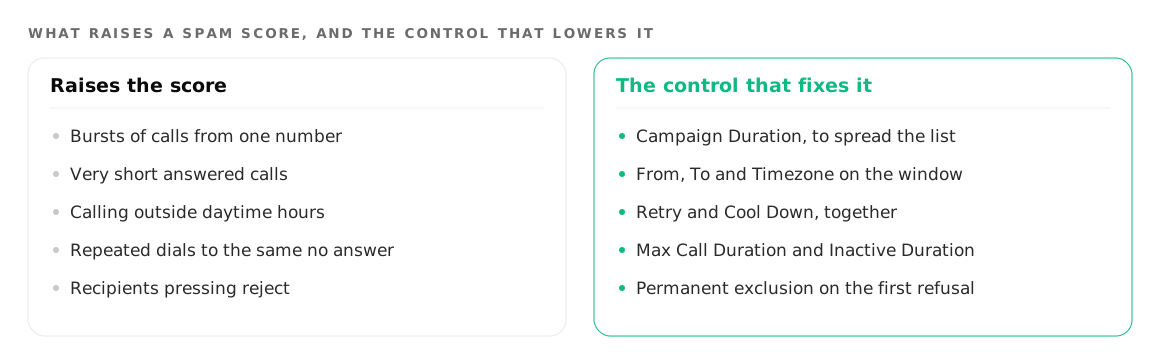
Why do outbound calls get blocked, and what stops it?
Carriers and handset apps decide whether your number rings normally, rings with a warning label, or does not ring at all. That decision is driven by behaviour, not by what you are selling.
Complaints and rejections are the signal. A number whose calls are rejected or reported quickly, repeatedly, from a pattern of short calls, gets flagged. Every list-quality decision in step 1 is really a deliverability decision.
Volume from a cold number looks like spam. A number that has never placed a call and suddenly places thousands in an afternoon fits the exact profile that filtering looks for. Start small, build up over days.
Repeat dialling is what triggers complaints. This is why the retry and cool down settings in step 3 matter as much as the script.
Give a real opt-out and honour it immediately. The agent should accept "stop calling me" in plain speech, in any phrasing, and that call must be recorded as do not call. The permanent exclusions exist so that this holds across every future round automatically.
Say who is calling, in the first sentence. Name the business. An opener that hides who is on the line converts worse and gets reported more.
In India there is an extra layer of carrier filtering that catches legitimate business calls as well as spam. Why your AI calls get marked Spam Likely in India covers what causes it and what can be done about it.
Where to go next
Payment reminders are the outbound use case with the tightest rules and the most to lose from getting the tone wrong. Payment reminder calls that stay polite covers the guardrails specific to collections.
If you have not built the agent the campaign will use, start with how to build an AI phone agent. For what phone agents handle in general, see phone agents.
Try it on your own number
Build an agent, point a number at it and listen to the first call.