
Put a job on the phone when the customer already has a phone in their hand and wants it settled now. Put it in web chat when the customer is browsing, reading detail, or needs something they can copy and keep. Foan sells both, and the honest answer is that neither wins across the board. The channel should follow the job, not the other way round.
There is also a third answer that vendors rarely give, which is that some jobs should not go to an agent at all.
What is actually different between the two?
These are not the same product with a different skin. They behave differently in ways that decide channel fit.
| Voice agent | Chat agent | |
|---|---|---|
| Where it lives | The phone network, inbound and outbound | A widget on your website |
| Who starts it | Either side. The agent can place calls as well as answer them | The visitor, on a page you control |
| Who the customer is | Identified by the number that arrives on every call | Whoever is on the page, unless you tell the agent otherwise |
| Reaching people who are not on your site | Yes, that is the point of outbound | No |
| Pace | The customer's speaking pace, one thread, no scrollback | The customer's reading pace, with scrollback |
| Handing over | Can transfer the live call to a person | Can offer an in-browser voice call, or a phone callback through a Callback Agent |
| Where you read it back | Call History | Chat History |
| Knowledge | Organisation knowledge bases | The same organisation knowledge bases |
Two of those rows matter more than the rest.
The first is identity. A voice agent knows the number the call came from, on every call, without asking. That makes "look up my order" a one-step job on the phone and a two-step job in chat, where the visitor is anonymous until they tell you who they are.
The second is direction. Only the voice agent can start the conversation. A chat agent cannot reach anyone who is not currently looking at your website.
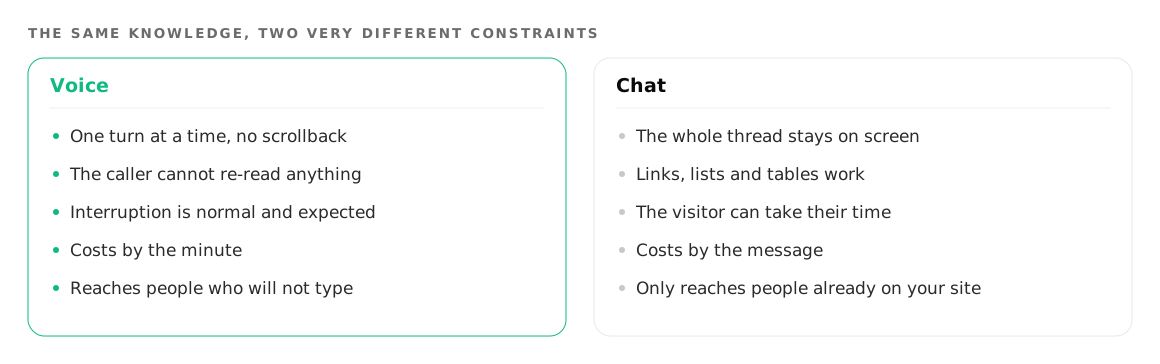
The choice is permanent, so make it deliberately
When you create an agent, the first thing you see is a dialog headed Choose Agent Type, with two cards: Voice Agent and Chat Agent. The dialog says the choice cannot be changed later, and it means it.
This is not a limitation to work around. It is a reason to think for ten minutes before clicking. A voice agent and a chat agent want different instructions anyway. A phone agent should speak in short sentences and never read out a URL. A chat agent can paste a link, list six options and show a price table, and it should.
If you want both channels, build two agents and attach the same knowledge bases to each. That is the supported pattern, and it keeps your facts in one place. The mechanics of sharing one set of facts across both are in a chat widget that shares the phone agent's knowledge.
The agent type is fixed when you create the agent, so it is worth making one of each before you commit: create a free account and build both. Phone agents and web agents describe what each one does once it is live, and pricing shows why a minute and a message are not priced the same way. If you are leaning towards chat, adding a widget that shares your phone agent's knowledge is the practical next step.
When is voice the right channel?
Voice wins whenever the customer's hands, eyes or patience are already committed elsewhere.
The customer is already holding a phone. Someone who dials you has chosen the channel. Answering that call with a message telling them to visit your website is the fastest way to lose them.
The job is urgent. A booking for tonight, a delivery that has not arrived, a cancellation before a deadline. Urgency rewards a channel that resolves in one pass, and speaking is faster than typing for almost everyone.
The customer physically cannot type. Driving, cooking, on a shop floor, carrying something, on a two wheeler at a traffic light. A large share of Indian phone traffic comes from people in exactly this state, and they will not switch to a keyboard to talk to you.
You need to start the conversation. Payment reminders, appointment confirmations, delivery windows, follow-up on a lead that went quiet. A chat widget cannot do any of this. Outbound is also the place where per-minute cost bites hardest, so read what an AI voice call costs per minute before you run volume.
The caller identity is the whole job. Anything that starts with "which of your orders" is faster on the phone, because the number arriving with the call already answers it.
When is chat the right channel?
Chat wins whenever the answer is longer than a sentence, or the customer wants to keep it.
The customer is browsing. Somebody reading a product page has not decided anything yet. Asking them to pick up a phone is a much larger request than typing a question into a box in the corner of the page.
The detail is long or precise. Specifications, ingredient lists, sizes, warranty terms, eligibility rules, a comparison between two plans. Nobody wants a voice agent reading out a table.
The customer wants to copy or keep something. A reference number, an address, a link, a bank detail, a set of instructions. On a call that has to be repeated twice and written down badly. In chat it is already text.
The customer will not call. This is a real and large group. Plenty of people will type a question to a business and will never dial one, and outside business hours the reluctance gets stronger.
It is the middle of the night. A voice agent can answer at 3am, but many callers will not dial at 3am. The widget catches the question when the customer is actually awake and thinking about it, which is often when your team is not.
The action is low-risk and public. Which brings us to the security line.
Which channel gets the sensitive work?
A public chat widget authenticates with a token that sits in your page source. It is public by design. Anyone who views the source of your page can read that token, and with it they can read the agent's full instructions, its custom variables, and the setup of every tool it can call, including credentials saved inside those tools. Where in-browser calling is switched on, they can also start voice calls that you pay for.
It reaches nothing else in your organisation, and an agent can hold at most three active tokens, which you can revoke. But the rule this implies is simple and you should follow it.
Keep anything you would not print on the page itself on the phone side. Refunds, account changes, anything reading back personal data, anything that spends money. A voice agent that identifies the caller by the number the call arrived on is a better place for that work than a widget whose configuration is readable by the public. A chat agent that needs to do something sensitive should hand the visitor to a phone callback rather than doing it inline.
Some calls belong to a person whichever channel they arrive on. When the AI hands the call to a human covers what that handover sounds like on the voice side, which is the harder of the two to get right.
When should neither of them take it?
This is the part a vendor is supposed to leave out, so here it is in the middle of the page instead of the footnotes.
When the customer is upset. Not confused, upset. Somebody who has already been let down does not want an efficient agent. They want a person who can apologise with authority and do something unusual to fix it. An agent that handles this one smoothly is worse than useless, because it delays the moment a human hears about it.
When the answer commits you to something unusual. A goodwill discount, a policy exception, a late cancellation you will honour anyway. Judgement calls belong to a person who carries the consequence, and an agent that improvises one is a liability whatever the channel.
When the facts do not exist anywhere yet. If the answer is not in a knowledge base, in your systems, or reachable by a tool call, no agent has it. It will either say it does not know, which is the right behaviour and still an unhelpful call, or it will guess. Fix the facts before adding the channel.
When it is legal, medical or financial advice. Information, yes. Advice, no. The line is whether the customer is being told what to do about their specific situation.
When the request is rare and complicated. The one that comes in twice a year and takes forty minutes. The engineering to handle it costs more than the two calls, and it will still handle them badly.
The useful way to build for this is to assume the agent will meet all of the above, and to make the handover fast when it does. On the phone that means a transfer to a real number. In chat it means routing the visitor to a person or a callback rather than looping.
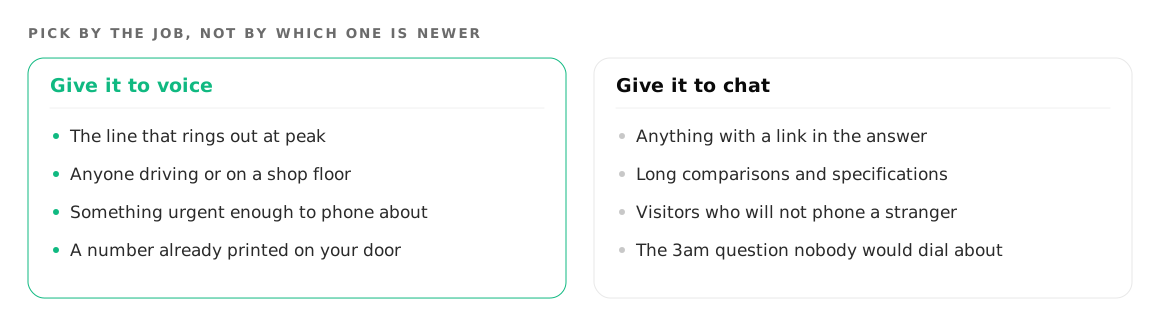
How to decide in practice
Start where you are already losing something measurable. If your line rings out at lunchtime, that is voice. If your site gets traffic and no questions, that is chat. If your follow-ups never happen because nobody has time to dial, that is outbound voice and nothing else will do.
Then add the second channel once the first one has a knowledge base worth sharing, because the second agent inherits it and is mostly a prompt away from working.
Where to go next
If the phone is your bottleneck, phone agents covers what a voice agent does on inbound and outbound calls, and what an AI voice call costs per minute covers what running it actually costs. If the website is where your customers are, web agents is the place to start, and a chat widget that shares the phone agent's knowledge shows how to keep one set of facts behind both.
Try it on your own number
Build an agent, point a number at it and listen to the first call.