
A property lead is worth the most in the first few minutes after it arrives, and least by the next morning. An AI voice agent is a good fit for that window: it can call the moment a portal enquiry lands, find out whether the person is in the market, and book a site visit. What it cannot do is negotiate. This post designs the workflow and marks that line.
Speed to lead is the entire game
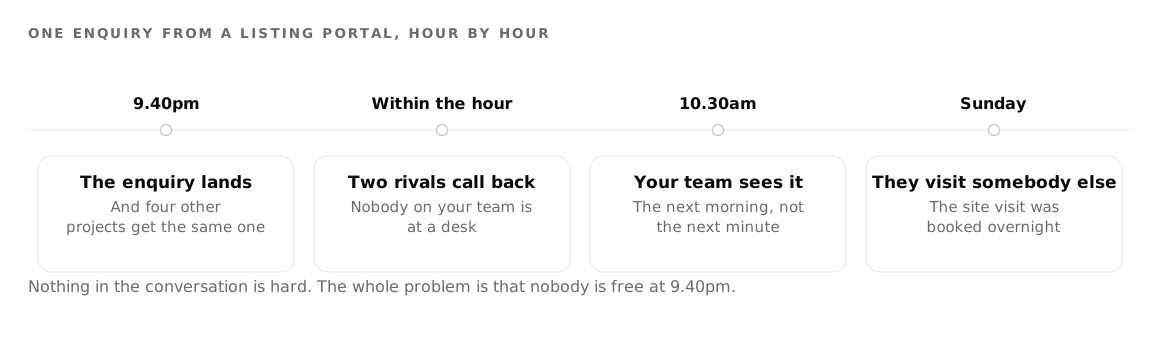
Consider a typical enquiry from a listing portal. It arrives at 9:40pm. Your sales team sees it at 10:30 the next morning. By then the same person has enquired on four other projects, two of which called back within the hour, and one has already booked their Sunday.
Nothing in the qualifying conversation itself is difficult. It is four or five questions that never change. The difficulty is entirely that nobody is free to make the call at the moment it would have worked. That is a scheduling problem, and it is the kind of problem an agent solves well.
Two ways to arrange it. The agent calls a batch of the day's leads as a campaign on a fixed rhythm, or your own system places the call over the API the instant a lead lands. The second is better and needs a developer for an afternoon. Start with the first.
What a qualifying call is actually for
Be honest about the goal. The call is not a sales pitch. It exists to sort a list into three piles: people worth a salesperson's time this week, people worth a call in three months, and people who are not in the market at all.
For an Indian builder or broker workflow, four questions do that sorting.
- Which project, and are they still looking? The first question checks the enquiry is real and current. A lead from a portal may have been submitted three weeks ago.
- Budget band. Not an exact figure, a band. People answer a range honestly and a precise number defensively.
- Possession timeline. Ready to move in, under construction, or an investment where the date does not matter. This single answer sorts more leads than budget does.
- Will they come to the site, and when? The one commitment worth asking for on a first call.
That is the whole call. Four questions, under two minutes, in whatever language the caller answers in. Write the Agent Task field around that sequence, and set the Language and accent field to describe your buyers rather than your office.
Build this against twenty real leads rather than a spreadsheet of test rows, so create a free account and set the campaign up as you read. Real estate covers the channel across a sales team, phone agents covers the call itself, and pricing is how you work out the cost of a qualified site visit.
Building the campaign
A campaign is a contact list plus an agent plus a set of rules about when to dial.
The contact file goes up as CSV or XLSX. The downloadable template carries a phone number column and a participant name column, followed by one column for every custom variable your agent uses. That last part is what makes a single agent usable across a portfolio.
Put the project name in a custom variable. Then one agent, with one prompt, can call leads for four different towers, and each call opens with the right name because the row supplied it. Add the configuration, the locality, the price band, whatever the opening line needs. You are not writing an agent per project, you are writing one agent and feeding it rows.
On the Call Settings tab you set retry behaviour, a cool down between attempts, a maximum call duration and an inactivity cut off. On Campaign Details you set the calling window as a From and To hour with a timezone. Set that window to something a person would find reasonable, because the fastest way to make your number worthless is to dial at breakfast. Setting up an outbound campaign covers the list hygiene and the opener in more detail, and why AI calls get marked Spam Likely in India covers what happens to your number if you get the pacing wrong.
Getting the answers out without reading transcripts
A campaign has a data extraction step, and it is the part that turns calls into a pipeline rather than an archive.
You define the fields you want, and the extraction pulls them out of the conversations. Budget band, possession timeline, preferred configuration, site visit interest, each as a column you can sort. A sales manager who has to open sixty transcripts to find the four good leads will not do it. A sales manager who can sort a table by budget band will.
Define the fields before the first call. The questions the agent asks and the fields you extract should be the same list, in the same order.
Six outcomes, not two
Most dialling tools tell you a call succeeded or failed, which is not enough information to decide what to do next.
Calls land in six buckets: answered, no answer, busy, rejected, voicemail and failed. The distinction that matters commercially is between the middle four. A busy line is a person who exists and was on another call, and is worth dialling again this afternoon. A rejected call is a person who saw the number and pressed decline. Voicemail means the number is live but the person is not picking up. A genuine failure is a technical problem on the line, and it says nothing at all about the lead.
Lumping those together as "failed" produces a follow up list that wastes effort on dead numbers and gives up on people who were simply mid conversation.
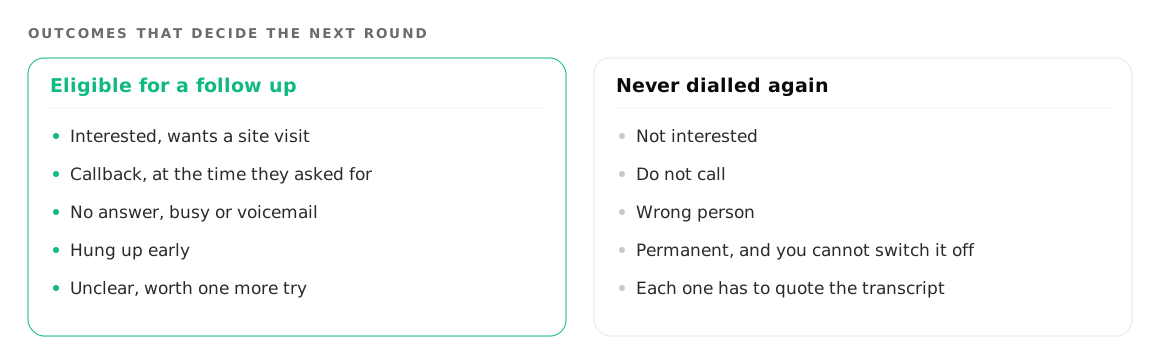
Separately, the calls where somebody spoke get an outcome drawn from what they actually said, including interested, asked us to call back, not interested, do not call, and wrong person. A call back can carry a time.
Follow up rounds, and the three you never call again
When a campaign finishes, Foan can create the next round automatically with the same agent, the same number and the same calling hours. A follow up round is a child campaign, and you decide who is in it by outcome: people who did not answer, people you never got to, voicemail, immediate hang ups, callbacks, and optionally the interested ones if you want to chase them.
You get up to five rounds after the first run, with a wait in days that you set between each.
Three groups are never dialled again, whatever you tick: anyone who said no, anyone who asked not to be called, and anyone who turned out to be the wrong person. That exclusion is permanent and you cannot switch it off. In property sales this is the guardrail worth having, because the cost of calling somebody for the fifth time after they told you to stop is not a lost lead, it is a complaint and a number that gets blocked.
Booking the site visit
The commitment you want from the call is a date. That needs a tool.
A function tool is a named action with a set of questions, pointed at a URL you control. Foan sends a POST with the collected answers and speaks whatever you send back, with an optional bearer token for authentication. There is no custom header field and no choice of method. Connecting an agent to your own APIs has the payload shape.
For a site visit booking, ask for the date and time, which project, and how many people are coming. Use the date and time question type and set its default timezone, so "Sunday morning" resolves against the site's clock. Do not ask for the phone number: it is already sent with every tool call.
Leave confirm before running on, so the agent reads the slot back before it books. Leave prevent duplicates on, so a lead who says yes twice does not appear on the register twice. Return something the agent can say out loud, such as the time and the site address, rather than a bare status.
One agent holds at most five tools, which here means book site visit, reschedule, check project availability and a spare or two. It is plenty for qualification and not enough for a full sales system, which is the correct amount.
Where the agent stops and the person starts
A voice agent qualifies and books. It should not negotiate.
Price, payment plans, discounts, floor rise charges, when the rate is going up: all of that is a person's conversation, and an agent that improvises around it will invent a commitment you have to honour or retract. Both are expensive. Write the boundary into the instructions and give the agent a line to use instead, offering to have the sales manager call.
The same applies to anyone who is clearly a serious buyer already, and to anyone who is annoyed. Hand those to a human. Handover is configured over the API rather than through a dashboard screen, and the behaviour is that the agent says a connecting line, the caller waits briefly, your salesperson is dialled and hears a short spoken briefing of the call, and then joins. The AI leaves at that point. If nobody picks up, the caller gets an apology instead of endless hold music, so point it at a phone somebody carries.
Where to go next
Run the first campaign on a list you already consider cold. You will find the questions the agent asks badly and the fields your extraction misses, on leads you were not going to call anyway.
Real estate covers the wider workflow, and outbound campaigns is the setup guide to keep open while you build the first one.
Try it on your own number
Build an agent, point a number at it and listen to the first call.